
Webmention Not Working
I received a lot of Github notification regarding “actions” that failed to run correctly
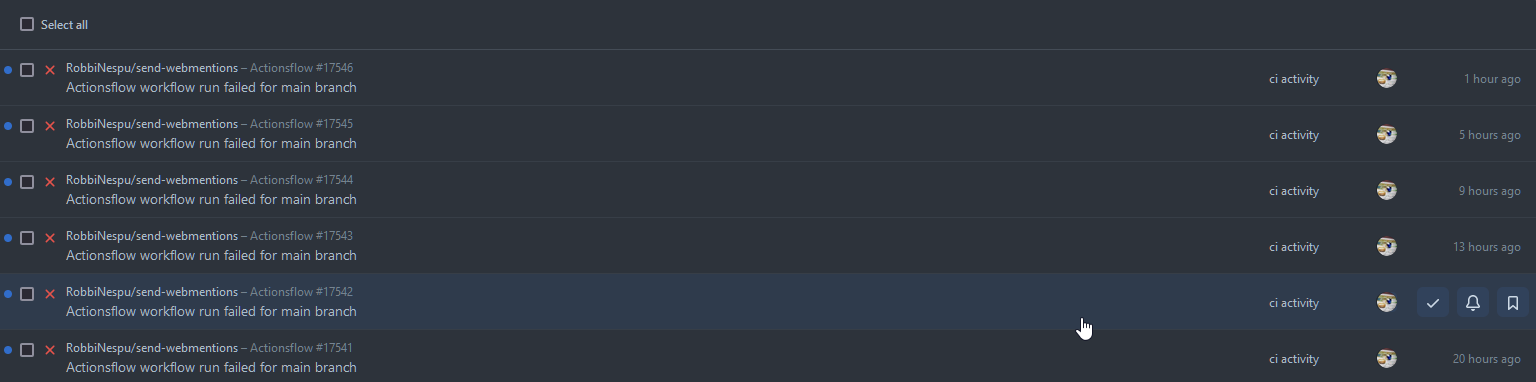
Previously it happen because of webmention.app issue#16 which is the script if not working without WWW as part of the URL.
That is just a easy fix. I did the changes and deploy the solution. It was working fine (for 1 weeks) until the https://webmention.app are totally down
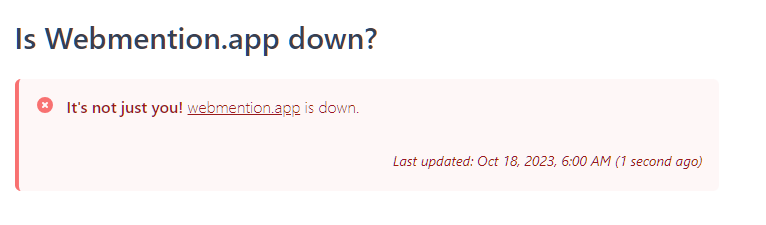
So currently, i not able sent webmention automatically (via triggering github-actions). My plan, maybe I will use https://telegraph.p3k.io , but I not sure yet if it API are capable to archive the same result like webmention.app.
Out of curiousity, i also check my webmention receiving endpoint which is https://webmention.io and unfortunately the system have internal issue.
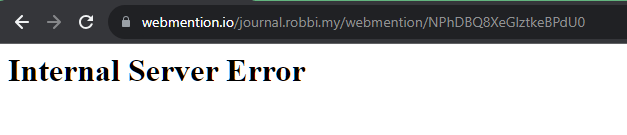
Sigh… so now both webmention-sender and webmention-receiver are not working.
I think it a time to bring-up my own self hosted webmention-sender and webmention-receiver but I am so busy with real life currently.
Have some thoughts, discussion or feedback on this post?
▸ What is webmention? How to send interactions!
webmention with this page.
You can also mention this URL on any website that supports WebMention.
Have you written a response to this post? Let me know the URL:Don't have WebMention? Use Comment Parade!

Replies (2)

I just noticed that the webmention.app website is serving and running using a JavaScript package, and it’s open source. You can find the source code on
GitHub
by
Remy
. This means that even if the webmention.app host is down, you can still use the service by hosting it yourself or using the CLI.
Hosting the service was never an option for me, so I decided to use the CLI to replace my current GitHub action jobs. Here’s the modified workflow :
name: Send webmentions for new blog posts
on:
  rss:
    url: https://journal.robbi.my/index.xml
    config:
      logLevel: debug
      limit: 1
jobs:
  send_webmentions:
    name: Send webmentions
    runs-on: ubuntu-latest
    if: github.ref == 'refs/heads/main'
    steps:

      - name: Checkout repository
        uses: actions/checkout@v2

      - name: Install webmention
        run: npm i -g @remy/webmention

      - name: Send webmentions
        run: webmention "${{on.rss.outputs.link}}" --send --debug
And it worked like a charm!
[Send webmentions for new blog posts/Send webmentions 0] ⭐  Run Send webmentions
[Send webmentions for new blog posts/Send webmentions 0]   | limit = 10
[Send webmentions for new blog posts/Send webmentions 0]   | send = true
[Send webmentions for new blog posts/Send webmentions 0]   | Fetching https://journal.robbi.my/notes/231024091253/
[Send webmentions for new blog posts/Send webmentions 0]   | Content has microformats
[Send webmentions for new blog posts/Send webmentions 0]   | entries = 1
[Send webmentions for new blog posts/Send webmentions 0]   | mentions = 1
[Send webmentions for new blog posts/Send webmentions 0]   | URLs to check: 1
[Send webmentions for new blog posts/Send webmentions 0]   | endpoints = 1
[Send webmentions for new blog posts/Send webmentions 0]   | endpoints-resolved = 1 {"source":"https://qiita.com/manabu-s/items/2f7f10752bcf44244718"}
[Send webmentions for new blog posts/Send webmentions 0]   | start send
[Send webmentions for new blog posts/Send webmentions 0]   ✅  Success - Send webmentions
Now, you are using the CLI to send webmentions for new blog posts, and it’s working smoothly!
I just noticed that the webmention.app website is serving and running using a JavaScript package, and it’s open source. You can find the source code on
GitHub
by
Remy
. This means that even if the webmention.app host is down, you can still use the service by hosting it yourself or using the CLI.
Hosting the service was never an option for me, so I decided to use the CLI to replace my current GitHub action jobs. Here’s the modified workflow :
name: Send webmentions for new blog posts
on:
  rss:
    url: https://journal.robbi.my/index.xml
    config:
      logLevel: debug
      limit: 1
jobs:
  send_webmentions:
    name: Send webmentions
    runs-on: ubuntu-latest
    if: github.ref == 'refs/heads/main'
    steps:

      - name: Checkout repository
        uses: actions/checkout@v2

      - name: Install webmention
        run: npm i -g @remy/webmention

      - name: Send webmentions
        run: webmention "${{on.rss.outputs.link}}" --send --debug
And it worked like a charm!
[Send webmentions for new blog posts/Send webmentions 0] ⭐  Run Send webmentions
[Send webmentions for new blog posts/Send webmentions 0]   | limit = 10
[Send webmentions for new blog posts/Send webmentions 0]   | send = true
[Send webmentions for new blog posts/Send webmentions 0]   | Fetching https://journal.robbi.my/notes/231024091253/
[Send webmentions for new blog posts/Send webmentions 0]   | Content has microformats
[Send webmentions for new blog posts/Send webmentions 0]   | entries = 1
[Send webmentions for new blog posts/Send webmentions 0]   | mentions = 1
[Send webmentions for new blog posts/Send webmentions 0]   | URLs to check: 1
[Send webmentions for new blog posts/Send webmentions 0]   | endpoints = 1
[Send webmentions for new blog posts/Send webmentions 0]   | endpoints-resolved = 1 {"source":"https://qiita.com/manabu-s/items/2f7f10752bcf44244718"}
[Send webmentions for new blog posts/Send webmentions 0]   | start send
[Send webmentions for new blog posts/Send webmentions 0]   ✅  Success - Send webmentions
Now, you are using the CLI to send webmentions for new blog posts, and it’s working smoothly!
Comments section coming soon. For now, send a webmention or email.