
Use this - GrepWin [Windows]
This post was published over few years ago and it is kept here as a record of what I was working on at the time. Some of the details, links, or commands below may no longer be accurate, so please double-check anything before you rely on it.
If you are linux enthusiast users then you know how to “grep” and how useful this tools.
Sadly, there is no built - in tool on Windows that can beat “grep”. So I looking for third party software and found this tool called as “GrepWin”.
It licensed under “GPL-3.0 License”. Oh, please take note it only can be use if you are using Windows 7 SP1 and above, It won’t work on Windows XP or Vista!
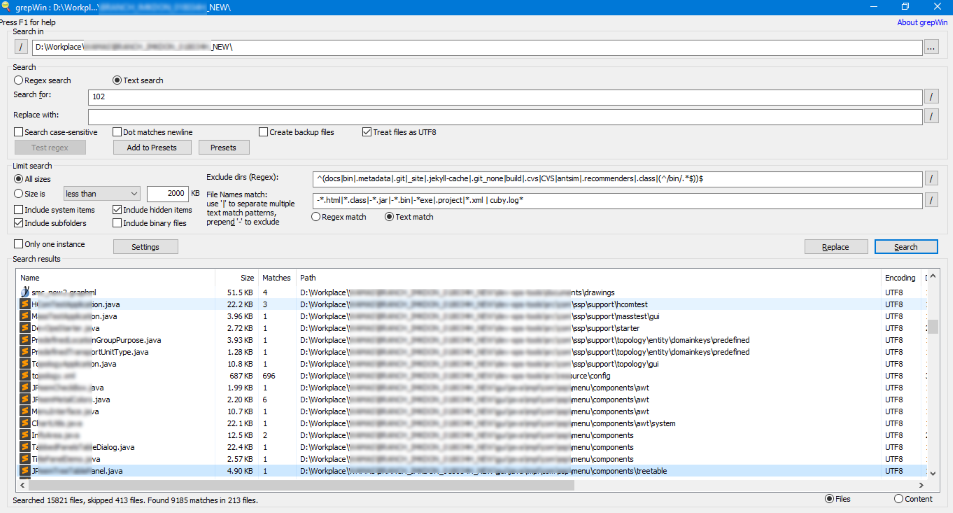
As you see, this tool support regular expression (regex) when searching or replacing operations.
From screenshot, you can see ^(docs|bin|.metadata|.git|_site|.jekyll-cache|.git_none|build|.cvs|CVS|antsim|.recommenders|.class|(^/bin/.*$))$ are use to filter and exclude directory.
After that -*.html|*.class|-*.jar|-*.bin|-*exe|.project|*.xml | cuby.log* are use to filter what file I don’t want it to check.
Plus option like file size, include hidden folder, include system folder, include binary file etc. The best part is it allow you to create backup when replacing text / strings is there if you need.
It also fast and not hang up when executed. I already tried searching with 18,000 files and it work very well. Bravo! Bravo! Bravo!
Since it opensource, you can visit https://github.com/stefankueng/grepWin repository to fork and contribute. For binary file, you can download from github release page directly.
Have some thoughts, discussion or feedback on this post?
▸ What is webmention? How to send interactions!
webmention with this page.
You can also mention this URL on any website that supports WebMention.
Have you written a response to this post? Let me know the URL:Don't have WebMention? Use Comment Parade!
No webmentions yet.
Comments section coming soon. For now, send a webmention or email.